

Mod Browse, Manual Mods Support, DLC Dependencies, and Discussions improve how players find and use mods, how creators publish them, and how title teams manage discussions around their mod catalogs.
Mod Browse: bring catalog workflows into the game
Mod Browse expands the Game API so titles can make core mod catalog workflows available directly in the game client.
The Game API supports:
- Mod status: Exposes whether each mod is installed, enabled, or disabled.
- Subscription and installation: Allows players to subscribe to and install supported mods through an in-game Mod Browser.
- Filtering and sorting: Allows players to filter mods by subscription status, enabled status, platform compatibility, and other supported criteria. The catalog can also be sorted using metrics such as popularity, based on the number of likes.
- Player actions: Supports liking and reporting a mod, as well as opening its Player Portal page in a browser.
- Catalog-wide controls: Allows players to enable or disable all mods, uninstall all installed mods, or sign out of the mod service.
- Structured reporting: Allows players to select a reason when submitting a mod report.
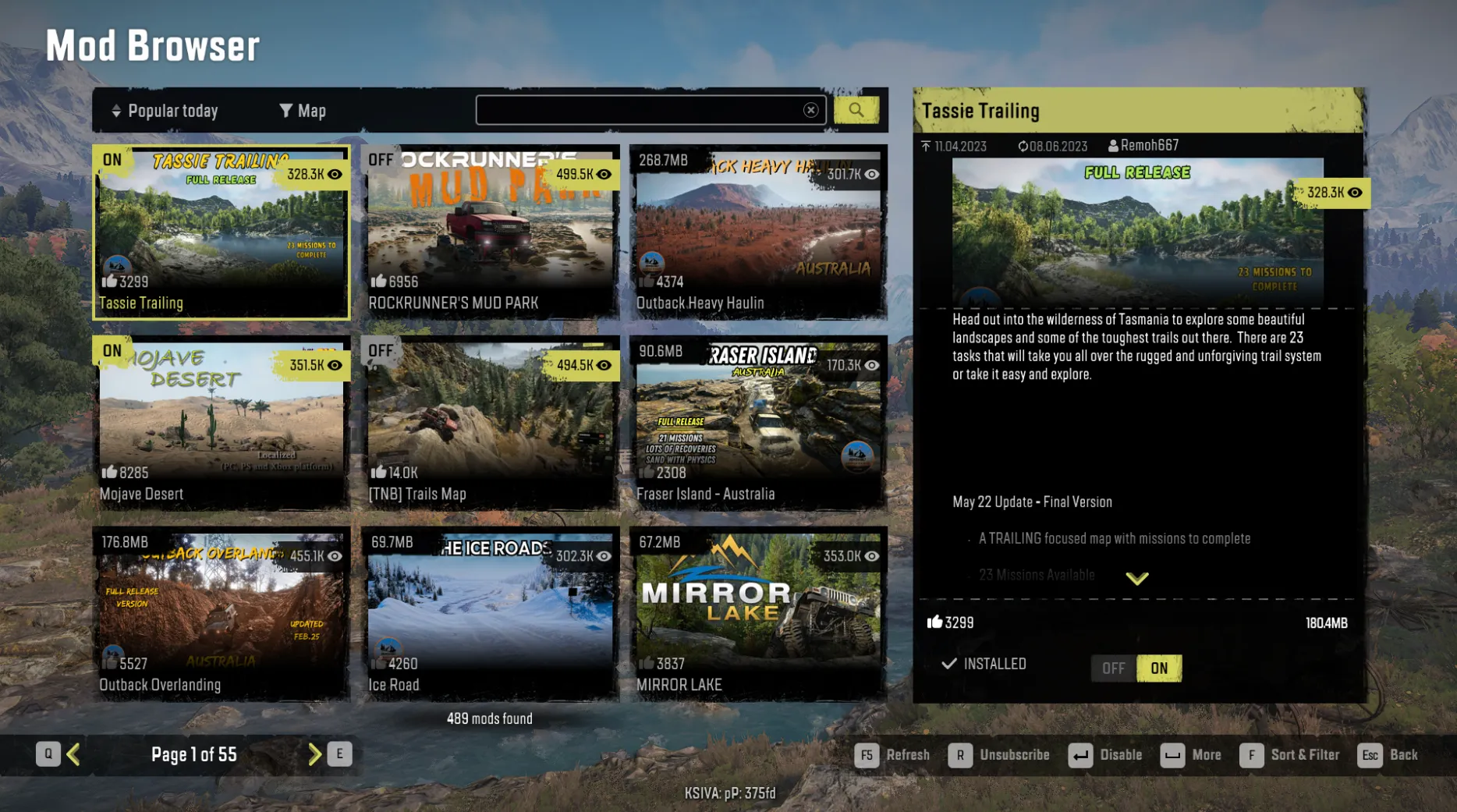
Titles can use these capabilities to build an in-game Mod Browser that reflects the core catalog workflows available in the Player Portal. The exact interface and supported controls remain part of each title’s implementation.
Manual Mods Support: publish installation instructions
Some mods require steps that cannot be completed through an automatic subscription flow.
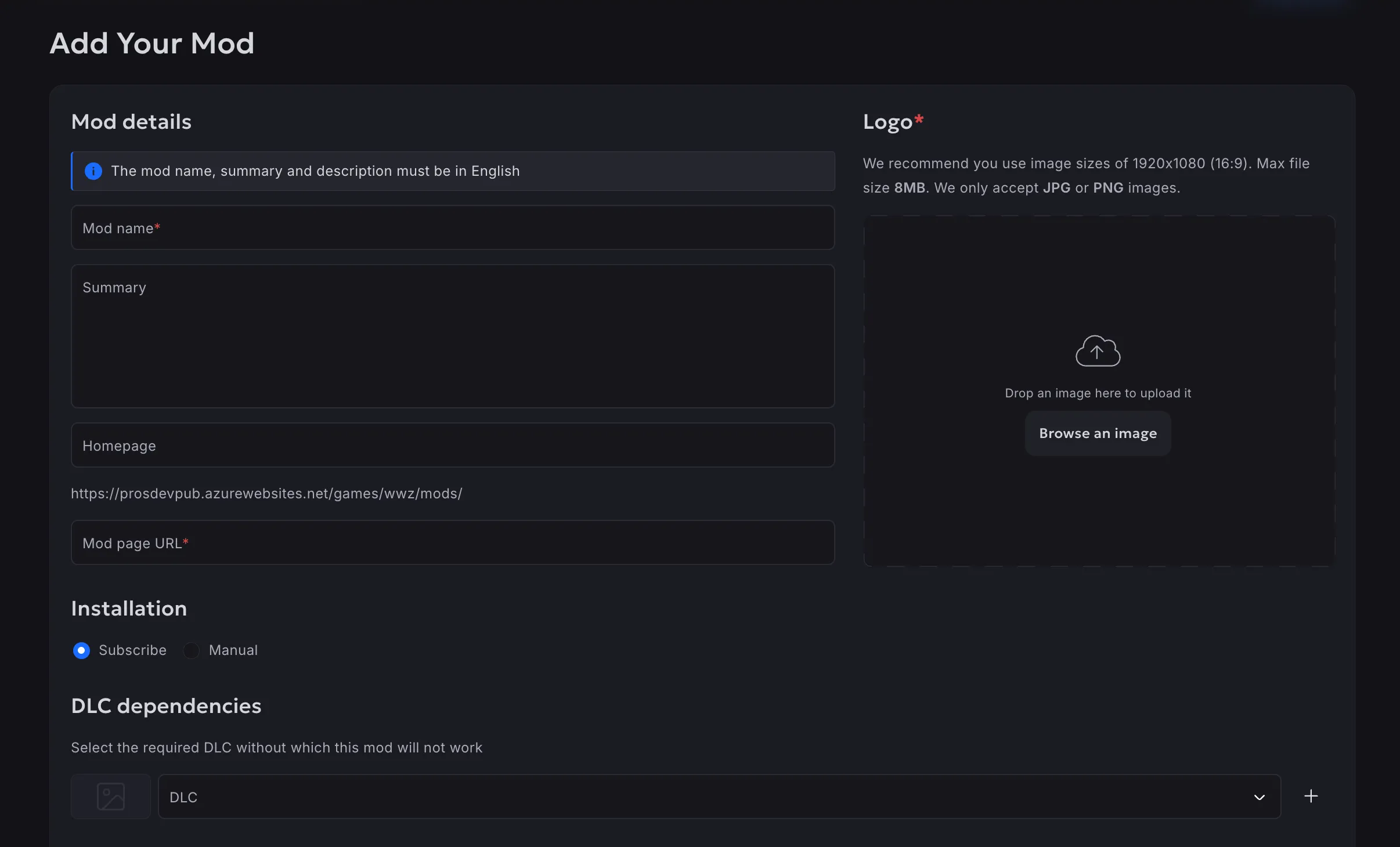
Manual Mods Support allows a mod creator to select Manual as the Installation Type and include the necessary installation instructions in the mod description. Players can review those instructions on the mod page in the Player Portal.
Manually installed mods can also be displayed in a game’s Mod Browser. The exact installation workflow remains defined by the title.
Manual Mods Support is optional and can be enabled separately for each title.
DLC Dependencies: show requirements before download
Some mods depend on content included in one or more DLCs. Without that information, a player may download a mod that cannot be used with their current game installation.
When DLC Dependencies are enabled for a title, mod creators can select one or more items from that title’s configured DLC list. The required DLCs are then shown with the mod so players can check the requirements before downloading it.
This helps players avoid downloading mods they cannot use because the necessary DLC is not installed.
DLC Dependencies are optional and can be enabled separately for each title.
Discussions: connect players and creators

Mod pages in the Player Portal now support comments. Players can share feedback, ask questions, describe issues, and discuss the content with its creator and other community members.
Players can also report comments that violate the applicable community guidelines or policies. Comment reports are available to moderators in the Developers Portal, where reported content can be reviewed and removed.
This gives creators a direct feedback channel while helping title teams manage discussions around their mod catalog.
Existing safeguards for mod catalogs
Alongside these updates, Hydra’s mod infrastructure provides moderation, safety, access, and policy controls for title teams.
- Automated and manual premoderation: Hydra supports automated checks and manual review before submitted mods are published.
- Profanity filtering and virus scanning: Text can be checked for prohibited language, while uploaded files can be scanned for viruses.
- Player reports: Players can report mods after publication, providing moderators with an additional signal for reviewing potentially problematic content.
- Anonymous access: Titles can let players use supported mod functions from the game client without requiring separate registration for the mod service.
- EULA support: Titles can present the applicable end-user license agreement as part of the mod experience.
Together, these controls help title teams review content before publication, respond to player reports, and define how players access and use their mod catalog.
Support more of the mod workflow
These updates connect several stages of the mod experience.
Players can browse and manage mods inside the game, understand whether a mod uses a subscription or manual installation workflow, check its DLC requirements, and communicate with creators. Mod creators can publish a wider range of content and provide the information players need to install and use it.
Hydra’s existing moderation and access controls support these workflows before and after publication.
To discuss how Hydra’s mod infrastructure could support your game and community, contact the Hydra Game Services team.
